Red Hat Display Font Family Free Download
Font

Red Hat Display Font Family Free Download

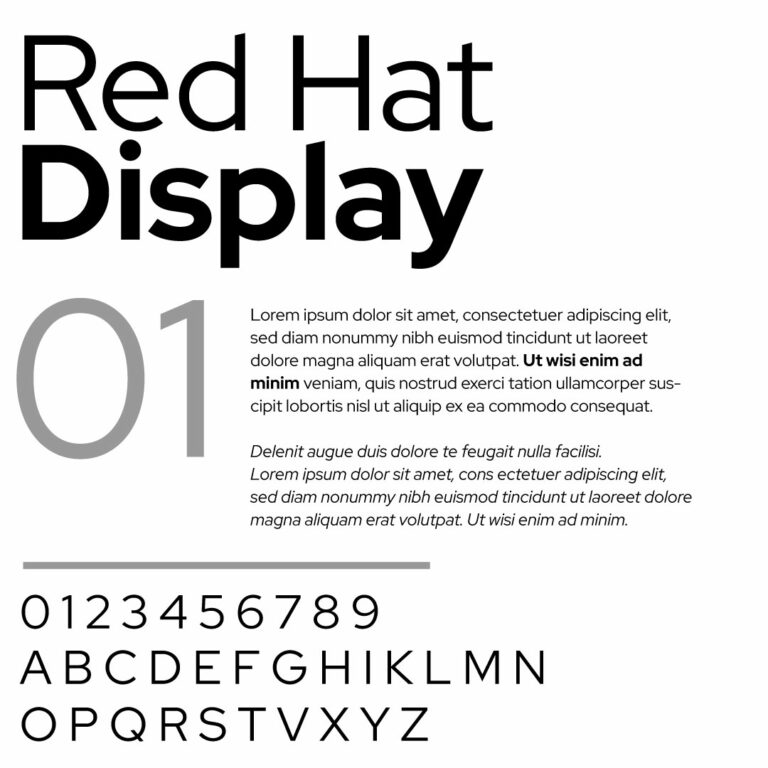
Download Red Hat Display font family for free in TTF format. This page includes both static and variable font options, so you can choose separate font files or use the variable version with adjustable weight control.

Red Hat Display is the headline and brand-facing cut of the Red Hat type system. It was designed for Red Hat’s 2019 identity refresh, the same rebrand that replaced the old Shadowman logo with the simpler red fedora mark.

The typeface was designed by Jeremy Mickel / MCKL and originally commissioned by Paula Scher / Pentagram for Red Hat’s new visual identity. Red Hat Display is also the font used in the Red Hat logo, which makes it more than a generic open-source sans-serif.

Font Information

Variable Axis: Weight, 300–900
Designer: Jeremy Mickel / MCKL
Commissioned By: Paula Scher / Pentagram
Created For: Red Hat brand identity
Font System: Red Hat Display, Red Hat Text and Red Hat Mono
Best For: Headlines, branding, landing pages, UI headings, open source projects, technology layouts and presentation design

Download Options

Red Hat Display Static Font Family
Choose the static version if you want each weight as a separate TTF file. This option is useful for predictable font menus, shared design files, presentation decks and workflows where every style needs to appear separately.

Red Hat Display Variable Font Family
Choose the variable version if you want smoother weight control from fewer files. The variable font lets you move across the 300–900 weight range in modern design apps and web typography systems.

Included Static Styles

RedHatDisplay-Light.ttf
RedHatDisplay-LightItalic.ttf
RedHatDisplay-Regular.ttf
RedHatDisplay-Italic.ttf
RedHatDisplay-Medium.ttf
RedHatDisplay-MediumItalic.ttf
RedHatDisplay-SemiBold.ttf
RedHatDisplay-SemiBoldItalic.ttf
RedHatDisplay-Bold.ttf
RedHatDisplay-BoldItalic.ttf
RedHatDisplay-ExtraBold.ttf
RedHatDisplay-ExtraBoldItalic.ttf
RedHatDisplay-Black.ttf
RedHatDisplay-BlackItalic.ttf

Included Variable Fonts

RedHatDisplay[wght].ttf
RedHatDisplay-Italic[wght].ttf

Static vs Variable: Which One Should You Download?

Download the static version if you want traditional font files such as Light, Regular, Medium, SemiBold, Bold, ExtraBold and Black installed separately. This is the safest option for older software, shared files and simple desktop workflows.

Download the variable version if you want finer control over weight. Instead of switching only between fixed styles, you can adjust Red Hat Display more precisely across the full 300–900 weight range in software that supports variable fonts.

For most designers, both versions are useful. Static files are easier to manage in traditional font menus. The variable files are better for exploration, UI systems, responsive typography and layouts where small weight changes matter.

About Red Hat Display

Red Hat Display was made for headlines, large text and brand moments. It is part of a larger type family that also includes Red Hat Text for body copy and Red Hat Mono for code.

The Display cut has a large x-height, open counters and tighter spacing. That makes it feel strong at headline sizes without becoming too decorative or too corporate.

Its personality sits between American sans-serif influence and modern technology branding. It feels more distinctive than a neutral UI font, but it is still clean enough for product pages, open source projects and developer-facing interfaces.

Similar Fonts

If you like Red Hat Display, you may also want to explore Red Hat Text, Red Hat Mono, Overpass, IBM Plex Sans, Public Sans, Source Sans 3, Inter, Archivo and Work Sans. These fonts work well for open source projects, technology branding, UI design, documentation and modern web typography.

Found this asset useful?

Share your thoughts, ask a question, or let us know what you’d like to see next.

Leave a comment